Guide
How to block Reddit
Reddit has a quirk the video feeds don’t: it exists in three forms. The official app, reddit.com, and a family of third-party clients. Blocking one moves the habit to the other two. Three ways to shut all three, with the steps of each and the button that gets around it.
First: count the doors
Before setting anything, note where you actually come in: the app, a browser tab, or a client like Apollo or Narwhal. The block has to cover every door, or it covers none. Reddit is also the app where a total block is least justified: people often go there for a specific answer. A generous exchange rate is often better than a shut door.
1. On iPhone, with Screen Time
- Open Settings, then Screen Time.
- Tap App Limits, then Add Limit.
- Search for Reddit in the field at the top of the list, tick it — and tick any third-party client you use while you’re there — then Next.
- Set the time. For a full block, choose 1 minute, the smallest allowed.
- Make sure Block at End of Limit is on, then Add.
For the website too: Screen Time → Content & Privacy Restrictions → Web Content → Limit Adult Websites, then add reddit.com under “Never Allow”.
Once the limit is hit, the icon greys out and the app opens on a screen that offers Ignore Limit — “One More Minute”, “Remind Me in 15 Minutes”, “Ignore Limit for Today”. A block you lift with a thumb isn’t one. To close that door: Settings → Screen Time → Lock Screen Time Settings, and a four-digit passcode typed by someone else. The limit resets every night.
2. On Android, with Digital Wellbeing
- Open Settings, then Digital Wellbeing & parental controls.
- Tap the chart at the top, or Show your data.
- In the list, tap the hourglass to the right of Reddit.
- Pick the shortest time offered, then OK.
When the time is up, the app shows “App paused” until midnight. The workaround is two taps away on that same screen, and Digital Wellbeing has no passcode to protect it from you; the only lock is Family Link, meaning another account manages yours. For a list of apps on a schedule, Focus mode, on the same page, does the job — with the same “Take a break” button. On Samsung the page is called “Digital Wellbeing and parental controls”, under “App timers”.
3. With Tempo: shut by default, reopened by moving
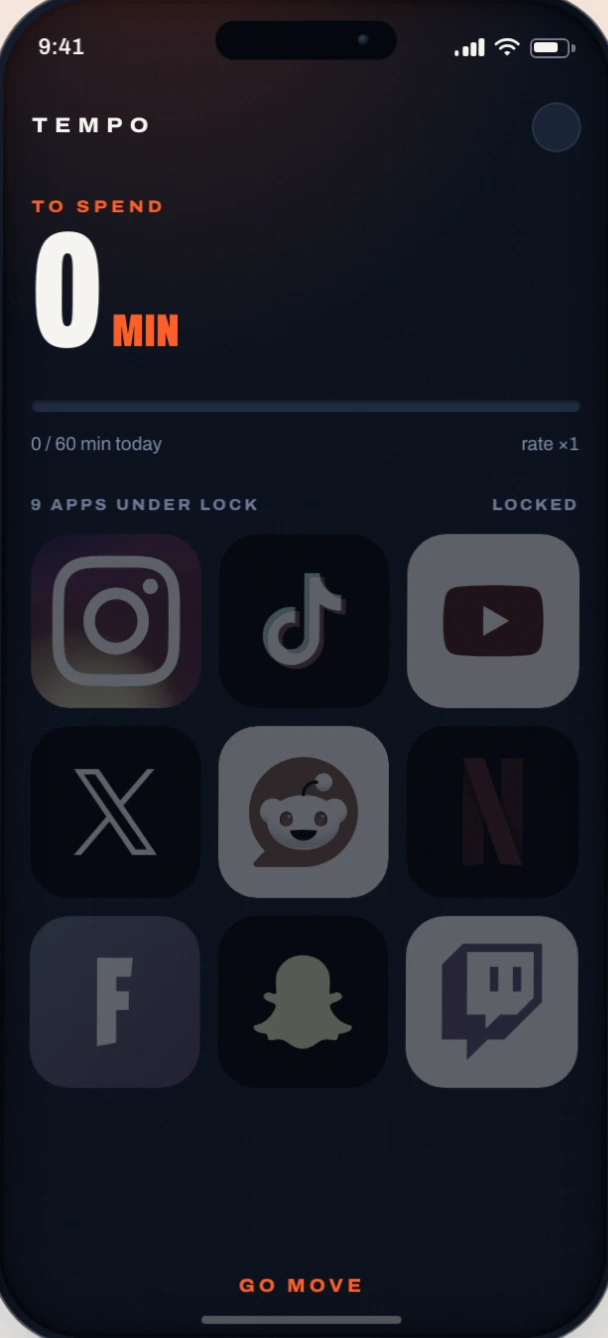
Both system settings leave an “ignore” button. Tempo replaces that button with a condition: the app stays shut while your screen-minute balance is at zero, and that balance only fills by moving — running, walking, the gym, cycling, at the exchange rate you chose.
- Install Tempo from the App Store or Google Play.
- On first launch, allow Health (to read your workouts and steps) and Screen Time (to block). On Android the permissions are called “usage access” and “display over other apps”; Tempo says where to find each one.
- Tick Reddit and any third-party client in the list of apps to lock. On iPhone, the same picker offers websites: add reddit.com to shut the browser too. On Android, blocking covers apps only for now.
- Pick your rate: at ×3, twenty minutes of walking reopen an hour, enough to find what you came for.
- That’s it. The app shuts at once, and reopens as soon as the balance is positive.
There is nothing to unlock, and nothing to ignore either: the only key is the sensor. A workout typed by hand into Health or Health Connect credits nothing. The minutes you spend inside drain the balance, and at zero everything shuts again — on iPhone, iOS does that on its own, with Tempo closed for hours. The balance is shared across every locked app. In the free version, spending is capped at 60 screen minutes a day: past that, what you earn waits for tomorrow. With no watch, a thousand steps are worth about ten minutes of walking, and the simulator on the home page runs the numbers with yours.
The notification catch
A blocked app keeps notifying: those banners come from the system, not the app, and none of the three methods has a say over them. A notification calling you towards a shut app is the worst of both worlds — so if the app goes under lock, the very next setting to change is its notifications, in your phone’s settings.
Frequently asked questions
How do I block reddit.com in the browser?
On iPhone: Settings → Screen Time → Content & Privacy Restrictions → Web Content → Limit Adult Websites, then reddit.com under “Never Allow”. With Tempo, the website is added to your selection from Apple’s picker and reopens with your balance. On Android, neither Digital Wellbeing nor Tempo blocks a website for now.
What about third-party clients like Apollo or Narwhal?
They are apps like any other: tick them in the same picker, next to the official app. A block that forgets them blocks nothing.
Does Reddit reopen on its own once I’ve earned minutes?
Yes. There is nothing to unlock: as soon as your balance is positive, every blocked app opens normally. Credit lands even without opening Tempo, at the end of a workout or as your steps add up.
Does it work without a watch?
Yes: your phone’s steps become the currency, and Tempo then sets a floor so walking alone still funds something.
Your screen time is earned.
Pick your apps, set your exchange rate, go move. Free version on iPhone and Android, no account to create.